
Message Compliance Inspection API
# Message Compliance Inspection API
# ● Use Case
The Sobot Live Chat system supports compliance detection on visitor messages. Once an administrator configures compliance rules and binds a third-party risk-control API in the backend, every visitor message triggers a call to that third-party API for content inspection. The system then tags each message based on the returned result.
Message compliance checking can block non-compliant text and images sent by visitors, protecting agents from harassing content. Visitor messages are first filtered through the Customer Sensitive Word filter, then inspected according to the Message Compliance Rules.
Third parties must implement their API according to the specifications in this document so that the Sobot system can call it.
# ● Configuration Steps
Compliance detection is configured in two steps: first add the API under API Management, then create a rule under Message Compliance Validation and associate it with the API.
Step 1: Add the API
Go to Admin Center → API Management, click Add API, and fill in the following information:
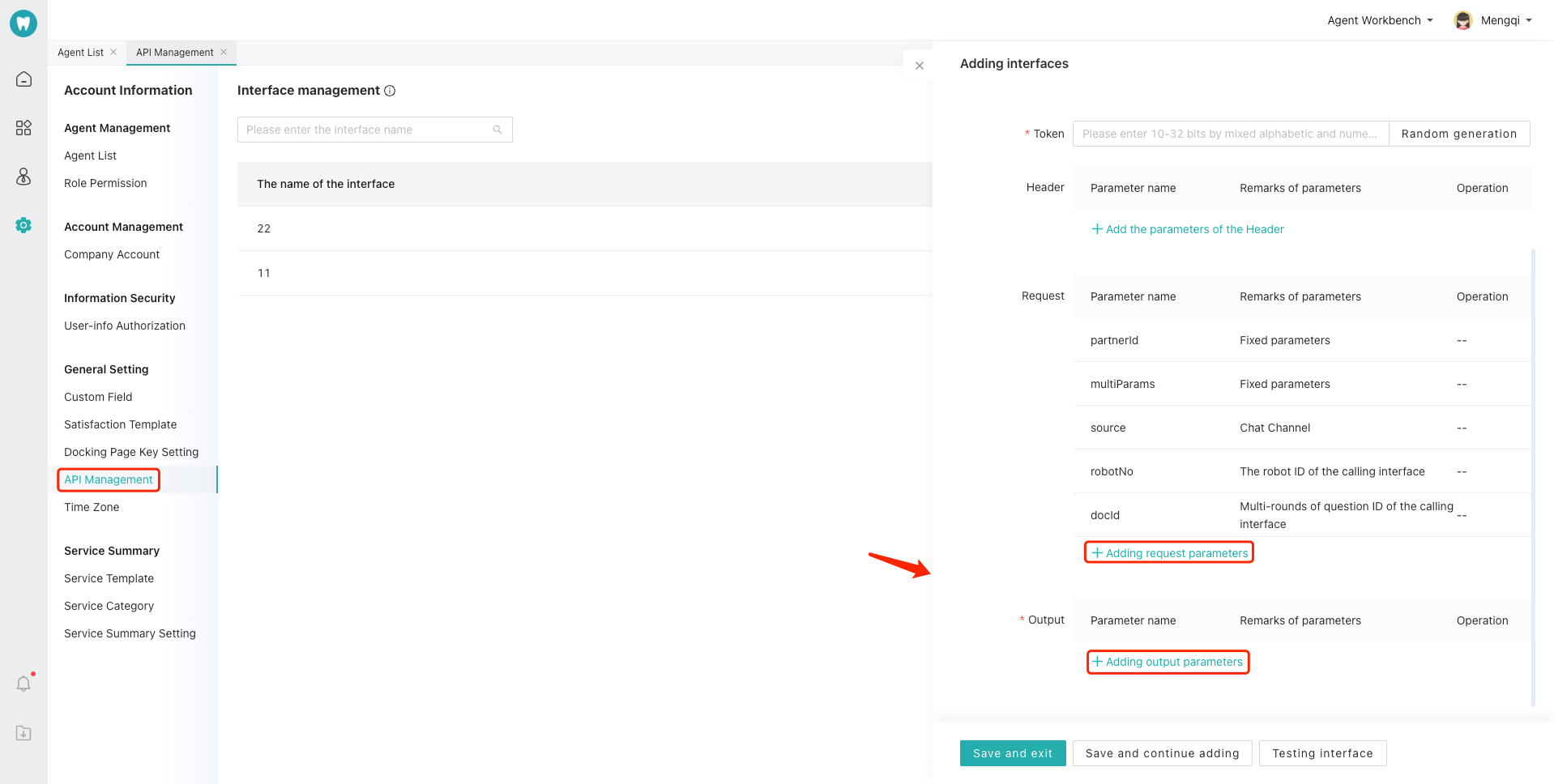
Request Parameters
| Parameter | Type | Required | Description |
|---|---|---|---|
| companyId | String | Yes | Company ID — the unique identifier of the enterprise in the Sobot system |
| cid | String | Yes | Conversation ID — the unique identifier of the current conversation |
| msgId | String | Yes | Message ID — the unique identifier of the current message |
| staffId | String | No | ID of the agent currently handling the conversation. Empty string when no agent has been assigned yet (pending-assignment stage) |
| msgType | Integer | Yes | Message type. 0 = Text, 1 = Image, 2 = Audio, 3 = Video, 4 = File, 5 = Object (card), 7 = Email |
| objMsgType | Integer | No | Object message sub-type. Only present when msgType = 5; identifies the specific object type. Null for all other msgType values |
| content | String | Yes | Message content. Plain text for text messages; resource URL for image/audio/video/file messages; JSON string for object messages |
Response Parameters
| Parameter | Type | Required | Description |
|---|---|---|---|
| msgId | String | Yes | Message ID |
| msgTag | String | Yes | 0 = Compliant; 1 = Non-compliant, soft block; 2 = Non-compliant, hard block |
Step 2: Add a Compliance Rule
Go to Live Chat → Settings → Chat → Sensitive Word Setting → Message Compliance Inspection, then click Add Rule:
| Field | Description |
|---|---|
| Rule Name | Custom name for the rule |
| Reception Mode | Select the reception plan(s) to which this rule applies |
| Detection Interface | Associate the API added in Step 1 |
| Message Types | Check the message types to inspect: Text, Image, Audio, Video, File, Card, Email |
| Status | Toggle switch. When enabled, visitor messages under the applicable reception plans will be inspected by this rule |
# ● Response Parameters
The third-party API must return the detection result according to the specification below. The response must be delivered within 3 seconds; otherwise the message is treated as compliant and displayed normally.
Response parameters:
| Parameter | Type | Required | Description |
|---|---|---|---|
| msgId | String | No | Message ID, corresponding to the msgId in the request |
| msgTag | Integer | Yes | Detection result tag |
msgTag values:
| msgTag | Meaning | Display behavior on the agent side |
|---|---|---|
| 0 | Compliant | Message content is displayed normally |
| 1 | Non-compliant, soft block | Blocked by default; the agent can click to view the original content, which is re-blocked after a page refresh |
| 2 | Non-compliant, hard block | Permanently blocked; the agent cannot view the original content |
Response example — compliant:
{
    "msgId": "msg_001",
    "msgTag": 0
}
2
3
4
Response example — non-compliant (soft block):
{
    "msgId": "msg_001",
    "msgTag": 1
}
2
3
4
Response example — non-compliant (hard block):
{
    "msgId": "msg_001",
    "msgTag": 2
}
2
3
4
# ● Error Handling
| Scenario | Sobot System Behavior |
|---|---|
| API timeout (> 3 seconds) | Message is treated as compliant (msgTag = 0) and displayed normally |
| API unreachable (DNS / network failure) | Message is treated as compliant (msgTag = 0) and displayed normally |
| API returns HTTP 5xx | Message is treated as compliant (msgTag = 0) and displayed normally |
| Malformed JSON response | Message is treated as compliant (msgTag = 0) and displayed normally |
| msgTag value is not 0, 1, or 2 | Message is treated as compliant (msgTag = 0) and displayed normally |
| Response body missing the msgTag field | Message is treated as compliant (msgTag = 0) and displayed normally |
Core principle: any error in the compliance detection process will never block message delivery — messages are always stored and pushed normally.
# ● Notes
- Performance requirements: The API must have sufficient concurrent processing capacity. Every visitor message triggers one call, with a timeout limit of 3 seconds. Response time is recommended to be kept under 1 second.
- Detection accuracy: The accuracy of detection results is the responsibility of the third-party API. The Sobot system performs no secondary validation.
- Visitor side is unaffected: Compliance detection only affects how messages are displayed on the agent side. Visitors always see all messages displayed normally.
- Rich content responsibility boundary: For object messages (msgType = 5), the content field is a complete JSON string that may contain multimedia elements such as images and videos. Sobot passes the full content without splitting or pre-processing it. Detection results apply to the entire message as a unit; tagging individual sub-elements separately is not supported.
- Idempotency: The same msgId will not trigger duplicate calls, but third-party APIs are still recommended to implement idempotent handling as a best practice.